Performance Dashboard 2.0

Coming soon to you!

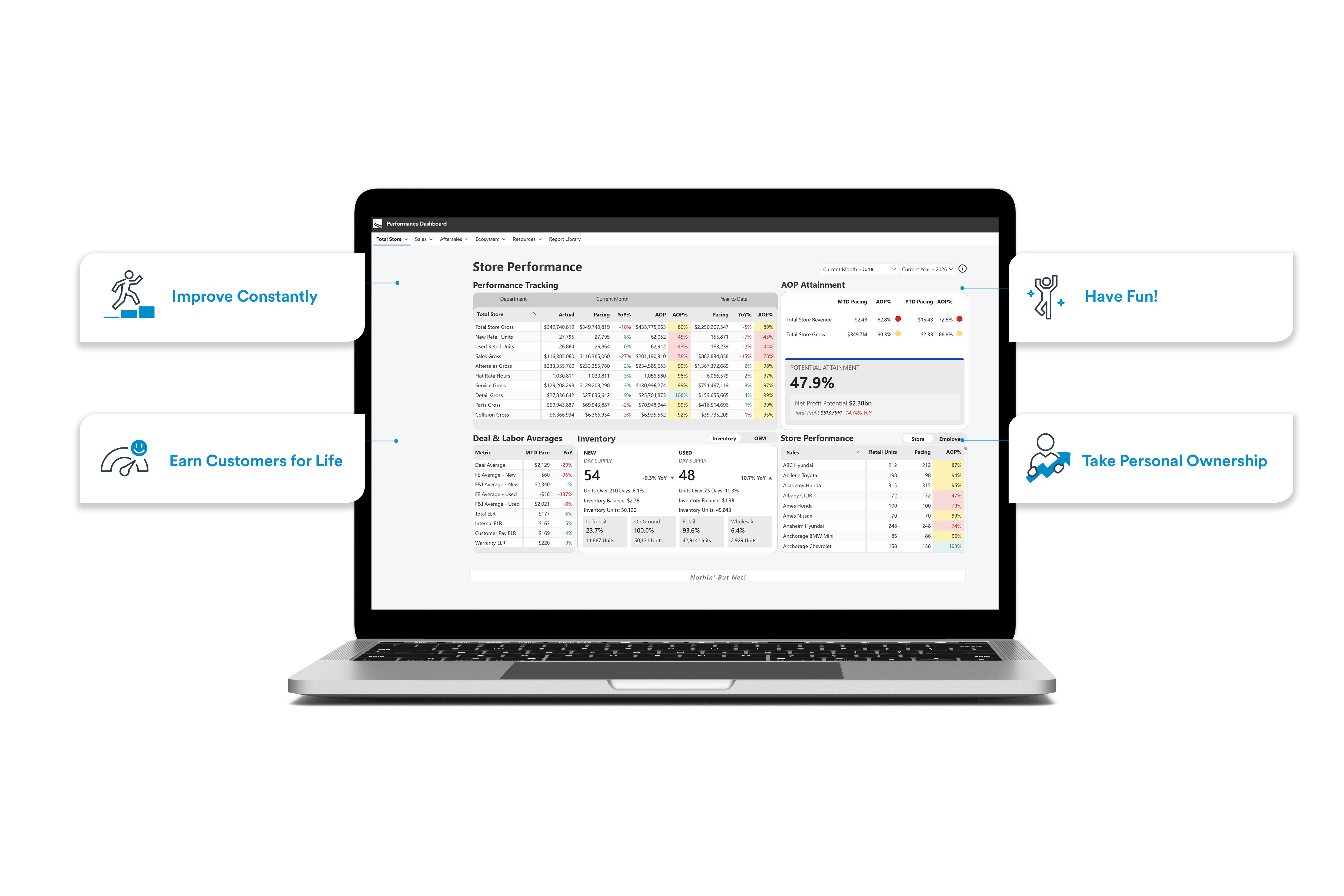
Performance Dashboard 2.0 offers an updated user experience to engage with the reports and metrics you’re already familiar with. The navigation is more intuitive, the data is more reliable, and this tool has been built on a modernized foundation set up with the future in mind–so we can Improve Constantly.

Rollout Schedule

Lithia Web Application Launcher, Go-Live
More Info
Western Region Pilot Group Business Manager Training
More Info
Eastern Region Pilot Group, Business Manager Training
More Info
Pilot Group Go-Live, All Positions
More Info
Total Company Go-Live, All Positions
More Info
Retirement of Performance Dashboard 1.0
More Info

What’s New

Streamlined Layout

Focus on What's Important

PD2.0 is streamlined based on extensive user feedback. The new Dashboard environment is intuitive, easy to understand, and focused on what’s most important.
Simplifying Access

Empowering Teams with Access to Information

Simplified access via the LAD App Launcher provides streamlined access and greater visibility to information, meaning store teams can leverage peer performance to understand Best Practices to drive high performance
View the App Launcher
Modernized Data

Built in the Cloud

Built on modern data infrastructure, PD2.0 is built for speed, accuracy, and reliability. By centralizing organizational business logic in a cloud-based environment, store teams can accurately track progress and make adjustments at the speed of business to support achieving their goals
Text Link
FAQS

Frequently Asked Questions

How can I get access to PD2.0?

Performance Dashboard 2.0 access will be provided to Pilot store teams on December 15, 2025, and provided to all store teams on January 21, 2026. Once your store has been set up with access, you’ll navigate to the Performance Dashboard via the LAD App Launcher: Lithia & Driveway Apps

The store or stores where I work aren’t set up in the My Store section. What do I do?

On the bottom right-hand corner of PD2.0 you’ll see a Support link. Click there to submit an “Internal Application Access Request” ticket via Service Now. Your request should be completed within one business day.

The Performance Dashboard isn’t working. Who do I contact?

On the bottom right-hand corner of PD2.0 you’ll see a Support link. Click there to submit an “Internal Application Issue” ticket via Service Now. The team will reach out to request additional information and provide a timeline for when the issue will be resolved.  

I have a suggestion for improving PD2.0. Who do I reach out to?

On the bottom right-hand corner of PD2.0 you’ll see a Support link. Click there to submit an “Internal Application Enhancement” ticket via Service Now. The team will reach out to better understand your idea and prioritize it based on overall benefit to the company.  

How often does PD2.0 refresh?

In the upper right corner next to the data field selector you’ll see an “i” icon. Hover there to see the most recent refresh timestamp. PD2.0 refreshes one time per day during regular business activity. On Business Days 1-5 (during the month-end process) the MIS data will refresh every two hours. As we continue to modernize Lithia & Driveway’s data infrastructure, you can expect to see further improvements to refresh timing in 2026.  

I don’t understand one of the metrics on my dashboard reporting and/or I believe the metric is wrong. Who do I reach out to?  

Reach out to your Business Manager and/or Regional Performance Analyst who are trained on how each metric is calculated and where the data is sourced from. They can advise on next steps to make any necessary corrections.

Training Video

Built on the foundation of our Core Values

Each section of the Performance Dashboard ties to our core values. Performance tracking helps us Improve Constantly; YoY Same Store comparison is how we measure Earning Customers for Life; achieving results in our AOP Attainment is a way to Have Fun!; and overall Store Performance guides us on how we can Take Personal Ownership.